

Your private library
Organize into collections, tag by model or topic, and parameterize anything with {{variables}}. Every edit auto-versions — roll back to any previous version in one click.
Copy any prompt to your clipboard in one click, then paste it into Claude, ChatGPT, Gemini, or Cursor. With the VS Code extension, skip the clipboard entirely.
 Claude
 ChatGPT
 Gemini
 Cursor
 Kiro
Kiro


 VS Code Extension
Search, insert, and save prompts without leaving your editor. Your whole library — starred, recent, collections — one shortcut away.
 Starred
 Search
 Recents
 Collections
 One-click Copy
 Variables
 Download Extension
Install
Open the Extensions panel (⇧⌘X), search "PromptOS" and click Install. Or go directly to the VS Code Marketplace.
Sign in
Go to promptos.dev/settings, generate an API key under VS Code Extension, then run PromptOS: Sign In from the Command Palette and paste it.
Search & use
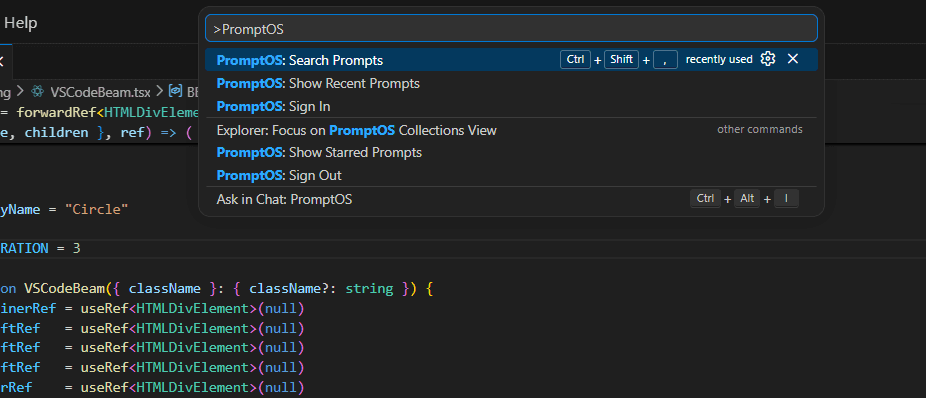
Press Ctrl+Shift+, to search your library, or browse collections in the sidebar. Select any prompt to insert it at your cursor.
Open the command palette with ⇧⌘P and type PromptOS to see all commands.
PromptOS: Search PromptsPromptOS: Show Recent PromptsPromptOS: Show Starred PromptsPromptOS: Save as PromptOS PromptPromptOS: Sign InTell us what you'd like to see in PromptOS — features, integrations, improvements.